

When it comes to rendering large lists in React Native, performance can become a bottleneck. Rendering a long list of items can cause delays and slow down the user interface, making the application feel sluggish and unresponsive.
But look no further because here comes the rescue!
Before we look into the solution, let’s discuss the problem!
The Problem?
When you render large lists which have 500+ items, then I’m pretty sure you ran into this warning
VirtualizedList: You have a large list that is slow to update — make sure your renderItem function renders components that follow React performance best practices like PureComponent, shouldComponentUpdate, etc.
This usually happens when we add lots of items to a FlatList, and those items contain dynamic components with animations or other interactions, it can slow things down.
The FlatList here simply says it can’t handle the list to render smoothly. Then you research on the internet and try to optimize the FlatList by using props like removedClippedSubviews, initialNumToRender, maxToRenderPerBatch, windowSize, getItemLayout and many more.
But it’s still not enough to make the list render smoothly.
What about The existing solution RecyclerListView?
RecyclerListView is a third-party package optimized for rendering large amounts of data with very good real-world performance.
RecyclerListView is JS only with no native dependencies, inspired by both RecyclerView on Android and UICollectionView on iOS. It is highly performant and is as feature-rich as the built-in FlatList component.
The flaws of FlatList were taken into consideration when developing the RecyclerListView package. RecyclerListView cleverly recycles previously produced views rather than creating new views for onscreen components and destroying views for offscreen elements. This technique is known as “cell recycling“. And it allows views that are no longer visible to be used to render items.
But as developers you must spend a lot of time understanding how it works, playing with it, and requiring significant amounts of code to manage. For example, RecyclerListView needs predicted size estimates for each item and if they aren’t accurate, the UI performance suffers. It also renders the entire layout in JavaScript, which can lead to visible glitches.
RecyclerListView works very well! But it’s just too difficult to use most of the time. It’s even harder if you have items with dynamic heights that can’t be measured in advance.
The Solution
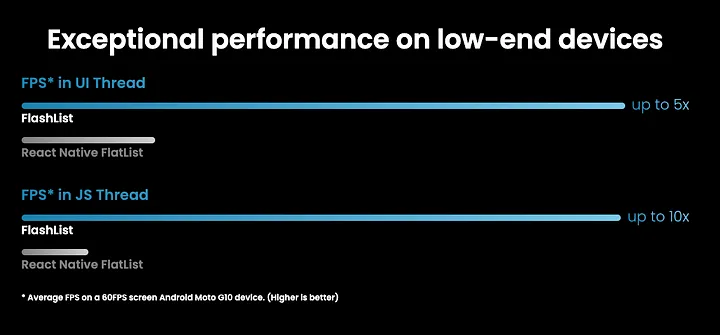
Meet FlashList! A speedy alternative to FlatList that works on the UI thread and according to their website, it runs 10 times faster on JS thread and 5 times faster on the UI thread.
To get started with FlashList, simply install it by running this command:
yarn add @shopify/flash-list
After you’ve installed FlashList, simply navigate to the ios directory and run pod install. That’s it! Your setup is complete.
FlatList and FlashList seem similar and have similar syntax. That means you can use all the FlatList props like data, renderItem, ListEmptyScrollComponent, and so on. If you are familiar with the FlatList properties, there won’t be many changes. The only difference is that it uses RecyclerView instead of VirtualizedList as the underlying component.
How FlashList is the best solution for FlatList and RecyclerListView?
FlatList was not performant enough, but was easy to implement, and RecyclerListView was performant, but its API was difficult to understand. So, the idea was simple: can we combine the best of both, using the FlatList API, but gain RecyclerListView performance? and That’s how FlashList⚡️ was born.

FlashList
					<FlashList
  data={DATA}
  renderItem={({ item }) => <Text>{item.title}</Text>}
  estimatedItemSize={200}
/>
Do you see how simple that is?
FlashList uses estimatedItemSize to determine the number of items that should be displayed on the screen during the initial load and while scrolling.
How does it achieve this? Rather than destroying the component when an item goes out of the viewport, FlashList renders the same component with different item properties. When using FlashList, it’s important to avoid adding key properties to the item component as recommended by React. This will prevent views from being recycled, which would negate all the benefits of FlatList.
Conclusion
And that’s that! Feel free to take a look at the library for yourself at https://shopify.github.io/flash-list/ and give it a try! You’ll see how easy it is to swap out your current FlatLists for FlashList, and you may notice some improved performance.
I hope this article has brought some new knowledge your way today. If you found it enjoyable and helpful, please don’t hesitate to give me a couple of claps! 👏
Happy Coding 🙂
Post Tags :
Share :


Get Started
Get Your Quote Today!
Tell us about your project and discover how our experts can help you achieve your goals through digital transformation.